Mod Chorus
Warm, musical stereo chorus with width, motion and analog-style depth.
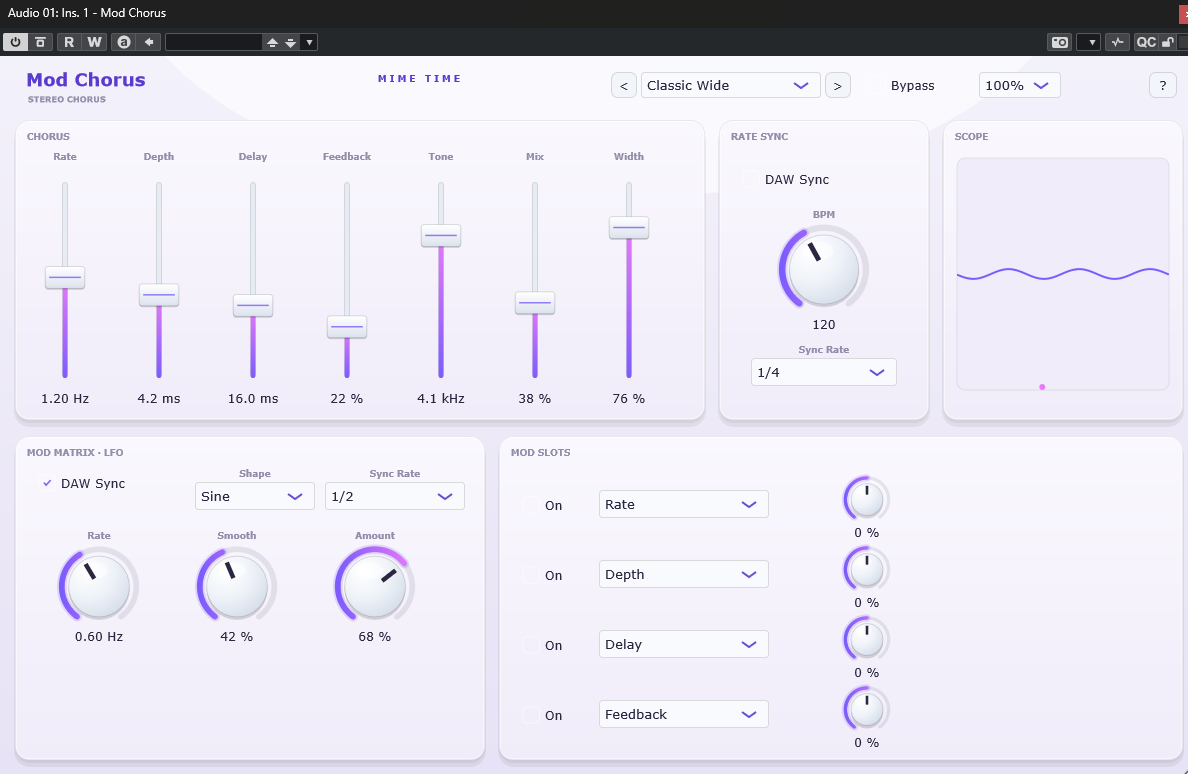
Mod Chorus ranges from subtle stereo thickening to lush, animated detune and vibrato textures. A dedicated rate-syncable LFO and a 4-slot modulation matrix let the movement evolve, while the tone control keeps the top end smooth and analog — never harsh.
Install
- Download the Mod Chorus package from www.mime-time.com.
- Copy Mod Chorus.vst3 to your VST3 folder:
- Windows: C:\Program Files\Common Files\VST3
- Rescan plugins in your DAW and load Mod Chorus on any track or bus.
Quick start
- Drop Mod Chorus on a synth, guitar, pad or vocal and pick a preset such as
Classic Wide or Shimmer Pad.
- Set Rate and Depth for the amount of movement (or turn on DAW Sync to lock
the rate to your project tempo).
- Use Delay and Feedback to shift from a thin shimmer to a thick, resonant chorus.
- Shape the top end with Tone, then set Stereo Width and blend with Mix.
- For evolving textures, open the Mod Matrix: pick an LFO shape and route it to any
parameter in one of the 4 slots.
Controls
| Section | Control | Range | What it does |
|---|---|---|---|
| Chorus | Rate | 0.05–8 Hz | Modulation speed (or synced division) |
| Chorus | Depth | 0–100 (0–10 ms) | Modulation depth |
| Chorus | Delay | 5–35 ms | Base delay time |
| Chorus | Feedback | 0–85 % | Resonant regeneration |
| Chorus | Tone | 250 Hz–12 kHz | Dark ↔ bright chorus colour |
| Chorus | Mix | 0–100 % | Equal-power dry/wet blend |
| Chorus | Stereo Width | 0–100 % | Stereo spread of the wet signal |
| Rate Sync | DAW Sync / BPM / Sync Rate | — | Lock Rate to host tempo and division |
| Mod Matrix | LFO Shape / Rate / Smooth / Amount | — | The modulation source |
| Mod Matrix | Slots 1–4 | — | Route the LFO to Rate, Depth, Delay, Feedback, Tone, Mix or Width (bipolar amount) |
| Header | Presets / UI Scale / ? | — | Browse presets, resize, open Help/About |
Presets
Classic Wide · Slow Vintage · Shimmer Pad · Vibrato Edge · Subtle Vocal
Tips
- Turn on DAW Sync and set Sync Rate to
1/8for rhythmic, tempo-locked movement. - Route LFO → Tone in a mod slot for a slow, breathing filter sweep on the chorus.
- Keep Mix modest on a bus for gentle stereo glue; push it for a full vibrato effect.
© 2026 Mime Time Studio · Free software under the GNU GPL v3 · Report a bug