Mod Filter
Modulated multi-mode filter with dual envelopes, LFOs and a modulation matrix.
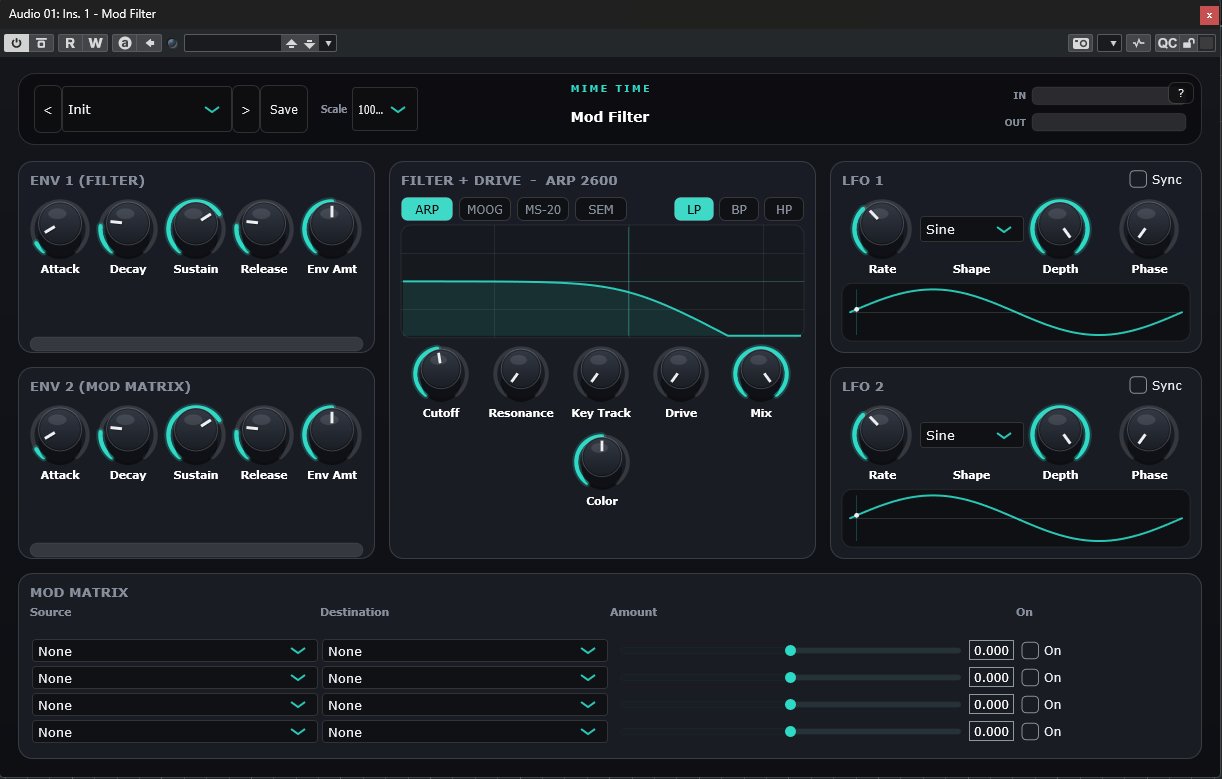
Mod Filter is a deep modulation filter for sound design and movement. Sweep a multi-mode filter with two envelopes and two LFOs, then route anything to anything through the built-in modulation matrix. Great for basslines, risers, plucks and evolving pads.
Install
- Download the Mod Filter package from www.mime-time.com.
- Copy Mod Filter.vst3 to your VST3 folder:
- Windows: C:\Program Files\Common Files\VST3 - macOS: /Library/Audio/Plug-Ins/VST3
- Rescan plugins in your DAW and load Mod Filter on any track. It also accepts MIDI
input, so you can trigger envelopes from notes.
Quick start
- Load Mod Filter and choose a preset to hear the engine in action.
- In the Filter panel set the mode, cutoff and resonance.
- Assign ENV 1 to the filter and dial its amount for a plucky sweep.
- Add an LFO and route it to cutoff in the Mod Matrix for continuous motion.
- Layer ENV 2 and LFO 2 through the matrix for complex, evolving textures.
Controls
| Section | Control | What it does |
|---|---|---|
| Top bar | Preset ◀ ▶ / Save | Browse and store presets |
| Top bar | Scale | Resize the interface |
| Top bar | ? | Open Help / About (website, report bug, licence) |
| Filter | Mode / Cutoff / Reso / Drive | Multi-mode filter core with saturation |
| ENV 1 | Filter envelope | Modulates the filter directly |
| ENV 2 | Mod-matrix envelope | A second envelope source for the matrix |
| LFO 1 & 2 | Shape / Rate / Depth | Two tempo-syncable modulators |
| Mod Matrix | Source → Destination → Amount | Freely route modulators to targets |
Tips
- Route LFO 2 to LFO 1 rate in the matrix for accelerating/decelerating sweeps.
- Drive the filter hard and use MIDI-triggered ENV 1 for expressive, playable tones.
- Small resonance boosts with a slow LFO create classic psy filter movement.
© 2026 Mime Time Studio · Free software under the GNU GPL v3 · Report a bug