Mod Flanger
Vintage-style stereo flanger — from gentle movement to dramatic jet sweeps.
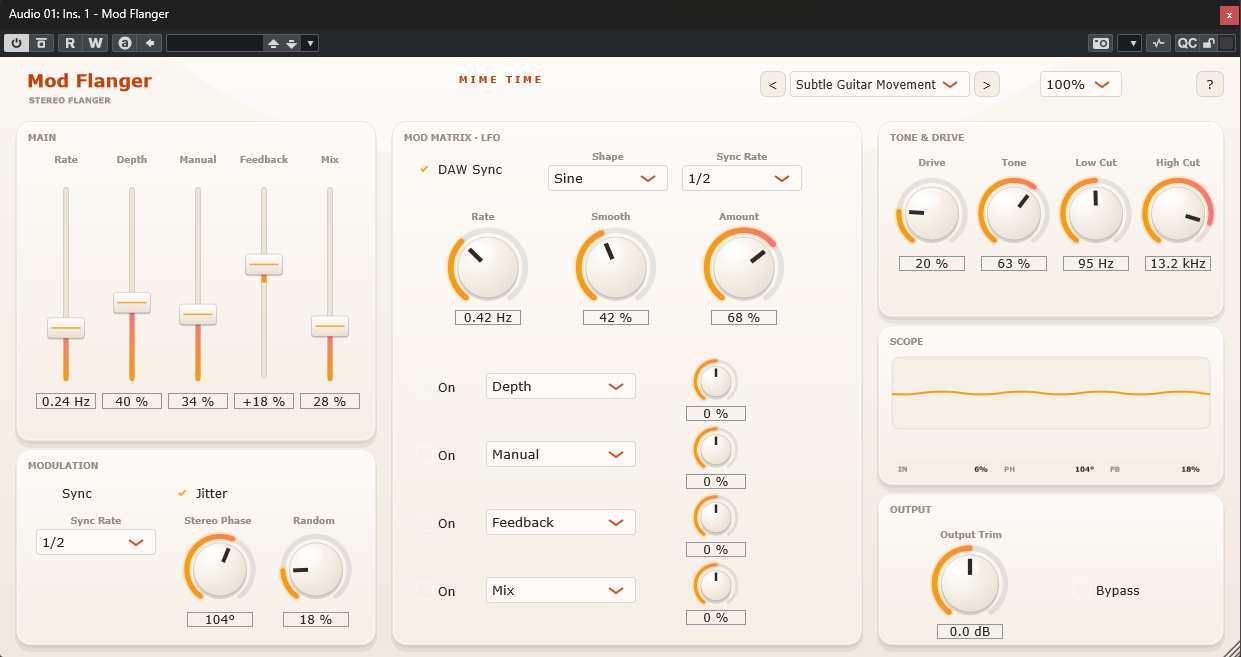
Mod Flanger captures the character of classic tape-based flanging: sweeping comb filters, rich stereo motion, drive-driven grit, and musical feedback. A rate-syncable LFO and a 4-slot modulation matrix keep the movement evolving. Great on guitars, synths, drums, vocals or full buses.
Install
- Download the Mod Flanger package from www.mime-time.com.
- Copy Mod Flanger.vst3 to your VST3 folder:
- Windows: C:\Program Files\Common Files\VST3 - macOS: /Library/Audio/Plug-Ins/VST3
- Rescan plugins in your DAW and load Mod Flanger on any track or bus.
Quick start
- Load Mod Flanger and pick a preset such as Subtle Guitar Movement or
Jet Flanger Drums.
- Set Rate and Depth for the sweep (or turn on Sync to lock to tempo).
- Use Manual to position the comb and Feedback for resonance — positive brightens,
negative gives the hollow "through-the-null" sound.
- Add Drive for grit, shape brightness with Tone, and clean up with Low/High Cut.
- Widen with Stereo Phase, blend with Mix, and trim level with Output Trim.
Controls
| Section | Control | Range | What it does |
|---|---|---|---|
| Main | Rate | 0.05–8 Hz | Sweep LFO speed (or synced division) |
| Main | Depth | 0–100 % | How far the delay is swept |
| Main | Manual | 0–100 % | Base delay offset / comb position |
| Main | Feedback | −95…+95 % | Resonance; negative = through-the-null |
| Main | Mix | 0–100 % | Dry/wet balance |
| Modulation | Sync / Jitter / Sync Rate | — | Tempo lock, organic jitter, division |
| Modulation | Stereo Phase / Random | 0–180° / 0–100 % | Stereo spread and random variation |
| Mod Matrix | LFO Shape / Rate / Smooth / Amount | — | The modulation source |
| Mod Matrix | Slots 1–4 | — | Route the LFO to Depth, Manual, Feedback, Mix, Tone, Drive or Output Trim |
| Tone & Drive | Drive / Tone / Low Cut / High Cut | — | Saturation, brightness and wet-signal filtering |
| Output | Output Trim / Bypass | −18…+18 dB | Level compensation and A/B bypass |
Presets
Subtle Guitar Movement · Jet Flanger Drums · Wide Synth Wash · Vocal Texture
Tips
- Automate Manual across a phrase for classic tape "through-the-null" sweeps.
- For parallel use, set Mix to 100 % on an aux bus.
- If it feels harsh, ease Feedback and darken Tone / High Cut.
- Check big Stereo Phase settings in mono if phase is critical.
© 2026 Mime Time Studio · Free software under the GNU GPL v3 · Report a bug