Psy Bass
Monophonic acid bass synth — 303 scream, Juno depth and SH-101 grit, with a built-in step sequencer and arpeggiator.
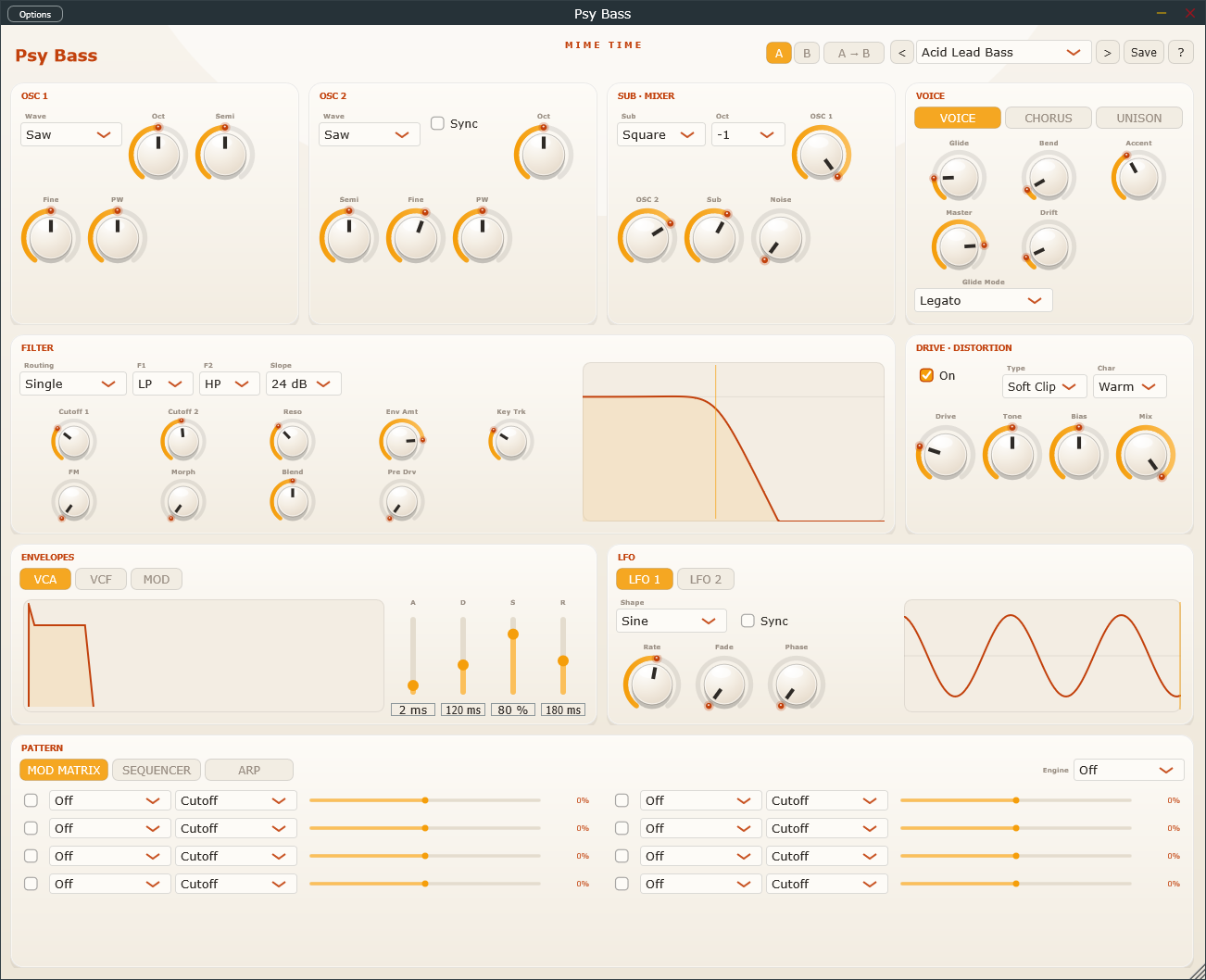
Psy Bass is a mono bass engine built for psytrance, acid and neuro. Two anti-aliased oscillators plus a sub feed a dual multimode filter with audio-rate FM, an oversampled drive stage, three analog-style envelopes, two LFOs and an eight-slot modulation matrix. Stereo unison thickens it into a wide Reese, the Juno-style chorus adds shimmer, and the built-in step sequencer and arpeggiator turn held notes into rolling 16th-note lines with per-step accent and slide.
Install
- Download the Psy Bass package from www.mime-time.com.
- Copy Psy Bass.vst3 to your VST3 folder:
- Windows: C:\Program Files\Common Files\VST3
- Rescan plugins in your DAW and load Psy Bass on an instrument track. It receives
MIDI, and the sequencer/arp lock to your project tempo.
Quick start
- Load Psy Bass and pick a preset from the top bar to hear the engine — there are
patches for acid, sub, rolling psy, growl, Reese and more.
- Play a note. Shape the sound with Cutoff, Reso and Env Amt in the Filter
panel, watching the live response graph on the right.
- Open the PATTERN section, set Engine → Sequencer, and load a sequencer preset
(Acid Roll, Rolling 16, Slide Groove…). Hold a note to transpose the pattern.
- For a wide bass, open the VOICE → UNISON tab and raise Voices, Detune and
Spread.
- Use the header A / B buttons to compare two versions of your patch.
Controls
| Section | Control | What it does |
|---|---|---|
| Top bar | Preset ◀ ▶ | Browse factory and your own saved patches |
| Top bar | Save | Save the current patch as a user preset |
| Top bar | A / B / A→B | Compare and copy two full patch states |
| Top bar | ? | Open Help / About (website, report bug, licence) |
| OSC 1 / OSC 2 | Wave / Oct / Semi / Fine / PW / Sync | Two anti-aliased oscillators (saw / pulse / triangle) |
| Sub · Mixer | Sub / Oct / OSC & Sub & Noise levels | Sub oscillator and source blend |
| Voice | Voice / Chorus / Unison tabs | Glide, bend, accent, master, drift · Juno chorus + depth · unison voices, detune, spread |
| Filter | Routing / F1 / F2 / Slope | Single, parallel or state-variable morph filter |
| Filter | Cutoff 1 / 2 · Reso · Env Amt · Key Trk · FM · Morph · Blend · Pre Drv | Dual multimode filter with audio-rate FM and a live response display |
| Drive | On / Type / Char · Drive / Tone / Bias / Mix | Oversampled saturation & distortion, dry/wet |
| Envelopes | VCA / VCF / MOD tabs | Three analog-style ADSRs with a live curve display |
| LFO | LFO 1 / LFO 2 tabs | Two shapes with an animated scope |
| Pattern | Mod Matrix / Sequencer / Arp tabs | Route modulators, or drive the synth with a step sequencer / arpeggiator |
Tips
- Slides in the sequencer glide between steps without retriggering the envelope —
the classic 303 behaviour. Combine with high resonance for squelchy acid lines.
- Turn up Filter FM for metallic, growling tones; it modulates cutoff at audio rate
from OSC 1.
- For a fat Reese, use two saws, Unison 5–7, Detune ~35 % and Spread ~75 %,
with Routing set to Parallel or SVF.
- The Drive stage is oversampled and post-filter with a dry/wet Mix, so you can
add grit without losing the low end.
- Route an LFO or Mod Env to Cutoff in the Mod Matrix for evolving movement
on top of the sequenced line.
© 2026 Mime Time Studio · Free software under the GNU GPL v3 · Report a bug