Psy Gate
Rhythmic trance gate with step sequencer, envelope shaper, filter and dual LFOs.
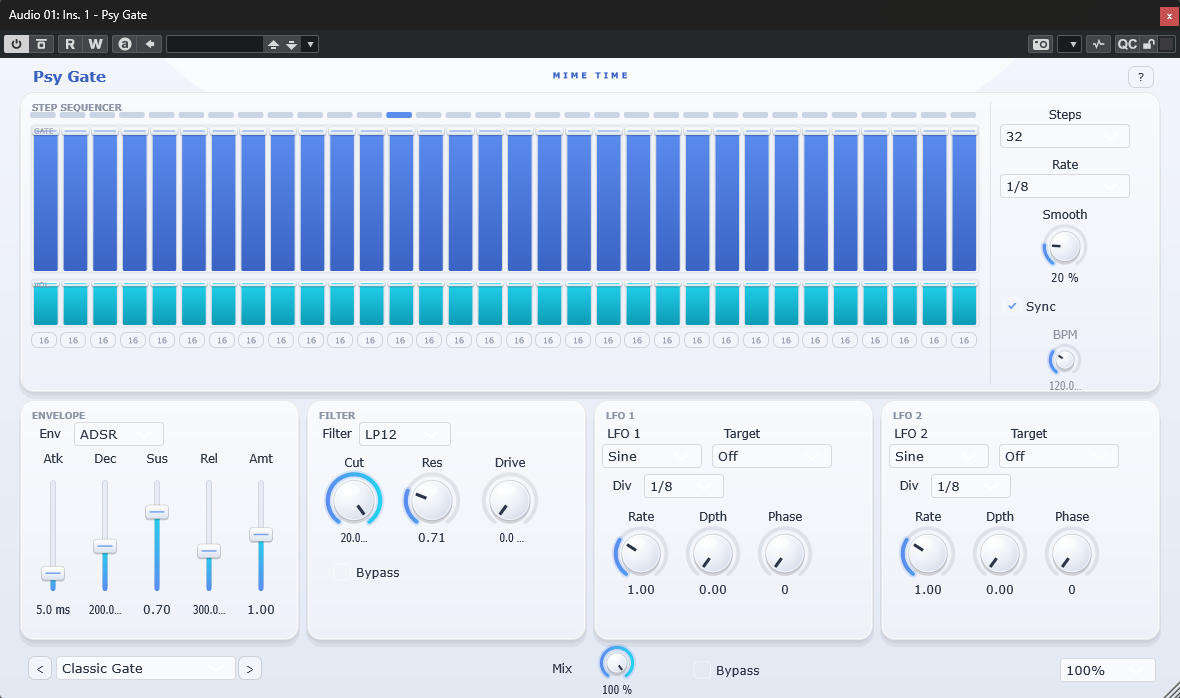
Psy Gate turns sustained sounds into pumping, rhythmic patterns. Draw a 32-step sequence, shape each hit with the envelope, colour it through the multimode filter, and add motion with two independent LFOs — perfect for psytrance, techno and cinematic rhythms.
Install
- Download the Psy Gate package from www.mime-time.com.
- Copy Psy Gate.vst3 to your VST3 folder:
- Windows: C:\Program Files\Common Files\VST3
- Rescan plugins in your DAW and load Psy Gate on a pad, chord or drone.
Quick start
- Load Psy Gate on a sustained source (pad, synth, noise) and pick a preset.
- Set the Step Count and Step Rate to match your groove (e.g. 16 steps at 1/16).
- Draw the gate pattern with the step buttons and adjust each step's volume bar.
- Shape the transient with the Envelope (attack / decay / sustain / release / amount).
- Add movement: enable an LFO, choose a target (cutoff, volume…) and set the rate.
Controls
| Section | Control | What it does |
|---|---|---|
| Header | Preset ◀ ▶ / dropdown | Browse factory presets |
| Header | ? | Open Help / About (website, report bug, licence) |
| Sequencer | Speed curve | Draw per-step timing/shape |
| Sequencer | Step volume bars | Set the level of each step |
| Sequencer | 16 / 32 step buttons | Toggle each step's note length |
| Steps | Step Count / Step Rate | Pattern length and playback division |
| Steps | Smooth | Slew between steps to soften clicks |
| Steps | Sync / BPM | Lock to host tempo or set a manual tempo |
| Envelope | Mode | Envelope behaviour per step |
| Envelope | Atk / Dec / Sus / Rel / Amt | Classic ADSR shaping plus depth |
| Filter | Type / Cutoff / Reso / Drive | Multimode filter with saturation |
| LFO 1 & 2 | Shape / Target / Rate / Depth / Phase | Two modulators for evolving motion |
| Global | Input / Output / Mix | Levels and dry/wet blend |
| Global | Soft Clip / Bypass / Scale | Output safety, mute and UI scaling |
Tips
- Sync both LFOs to different divisions for polyrhythmic movement.
- Raise Smooth to avoid clicks on fast patterns.
- Use the Mix control to blend the gated and dry signal for subtle rhythmic texture.
© 2026 Mime Time Studio · Free software under the GNU GPL v3 · Report a bug