Saturator
Analog-style saturation with drive, bias, tone, stereo width and a 3-band EQ.
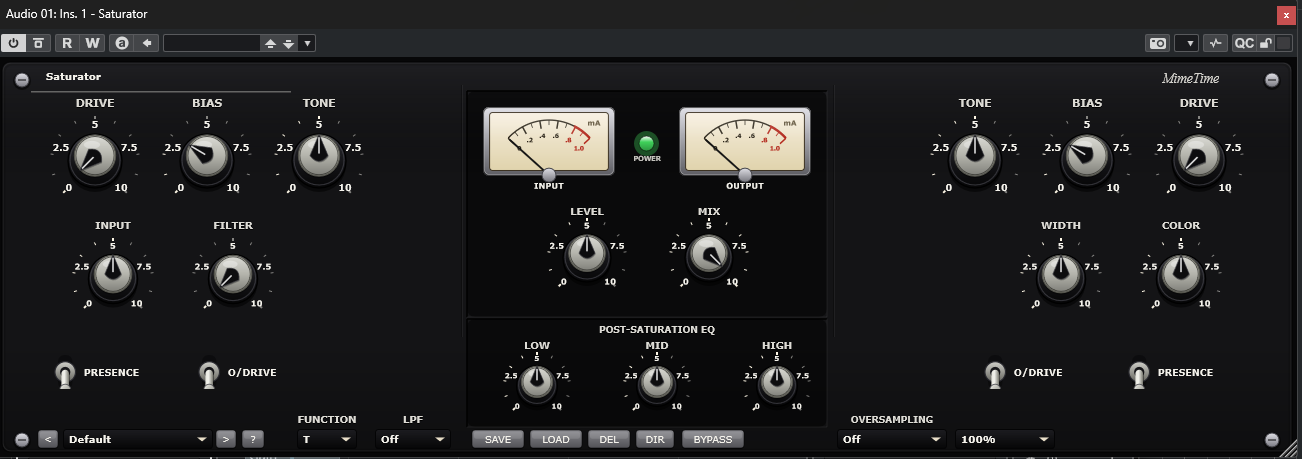
Saturator adds warmth, harmonics and glue to any source. Push the drive for gentle tape-style colour or aggressive overdrive, sculpt the character with bias and tone, and finish with a post-saturation 3-band EQ. Independent left/right strips and a stereo width control make it equally at home on a single track or the master bus.
Install
- Download the Saturator package from www.mime-time.com.
- Copy Saturator.vst3 to your VST3 folder:
- Windows: C:\Program Files\Common Files\VST3
- Rescan plugins in your DAW and load Saturator on a track or bus.
Quick start
- Load Saturator and pick a preset, or start flat.
- Choose a Saturation Type and raise Drive until it feels right.
- Adjust Bias for even/odd harmonic balance and Tone to brighten or darken.
- Use the 3-band EQ to shape the saturated signal.
- Blend with Mix and match levels with Makeup Gain; enable Oversampling for
clean high-drive settings.
Controls
| Section | Control | What it does |
|---|---|---|
| Bottom bar | Preset ◀ ▶ / dropdown | Browse presets |
| Bottom bar | Save / Load | Store and recall your own presets |
| Bottom bar | ? | Open Help / About (website, report bug, licence) |
| Input | Input Gain | Level into the saturator |
| Input | Sidechain / SC Filter | Frequency-dependent drive |
| Saturation | Drive | Amount of saturation |
| Saturation | Overdrive | Harder clipping stage |
| Saturation | Type | Selectable saturation curves |
| Saturation | Bias | Harmonic balance (even/odd) |
| Saturation | Tone / Color | Brightness and character |
| Stereo | Width | Widen or narrow the stereo image |
| Output | Makeup Gain / Mix | Level compensation and dry/wet blend |
| EQ | Low / Mid / High | Post-saturation tone shaping |
| Bottom bar | Oversampling | Reduce aliasing at high drive |
| Bottom bar | UI Scale / Bypass | Resize the interface, mute processing |
Tips
- On the master bus, use low Drive with a high Mix and Oversampling on for
transparent glue.
- Push Bias toward odd harmonics for aggressive, edgy distortion.
- Automate Drive into a chorus for extra energy.
© 2026 Mime Time Studio · Free software under the GNU GPL v3 · Report a bug